Ethernet and Wi-Fi
Keep local console access available before changing the connection you use to manage the appliance. Sign in as an administrator, open System → Settings → Network, select an interface and choose Configure. Review DHCP or static IPv4 settings; for Wi-Fi, select or enter the network name and credentials. After applying, verify connectivity and choose Keep this network configuration within three minutes. Without confirmation the worker restores the old settings.
Configuration forms
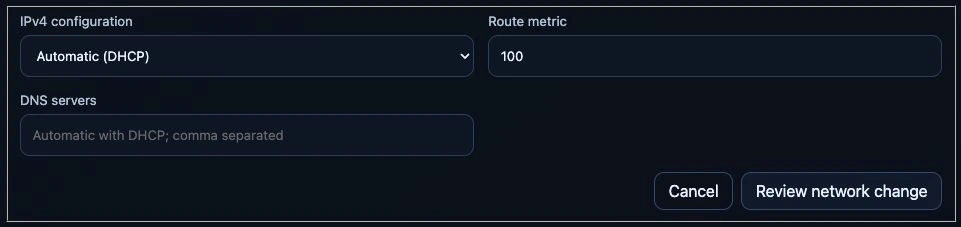
Unchanged Ethernet form, 24 September 2026. With DHCP selected, leaving DNS empty uses the automatically supplied values. Interface identifiers and addresses are outside the crop; no network change was submitted.
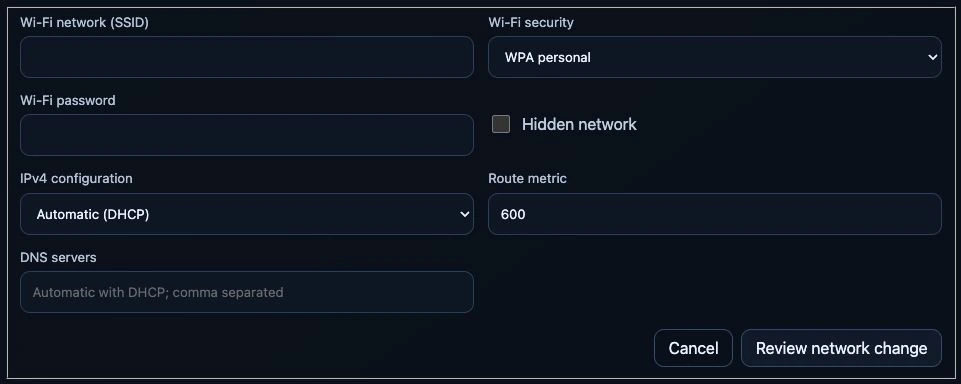
Unsubmitted Wi-Fi draft on the same test appliance, 24 September 2026. WPA personal was selected only to show its fields. No SSID or password was entered; the draft was cancelled without scanning, enabling the radio or connecting.
Supported configuration
The dashboard provides System → Settings → Network for administrators.
- Discover physical Ethernet/Wi-Fi interfaces through the host worker; show link state, addresses, gateway, MAC and current IPv4 settings.
- Edit DHCP or one static IPv4 address/prefix, gateway, DNS and route metric. Wi-Fi adds an explicit scan, manual/hidden SSID and open or WPA personal authentication. Lower metrics are preferred: Ethernet defaults to 100 and Wi-Fi to 600. IPv6 is displayed and preserved, not edited.
- Validate in API and root worker; bind requests to Node UID, boot and current configuration fingerprint, and require exact-host confirmation.
- Apply on trial with a supervised local service. Require Keep this network configuration within three minutes, otherwise restore the previous files.
- Verify authorization, credentials and rollback in isolated tests. Physical link changes require separate acceptance with local console access.
There is no second network manager, automatic Wi-Fi switching or privileged
dashboard Pod. The current Netplan backend is retained. An explicit iw scan
does not replace the connection but can briefly use radio airtime.
Scanning requires an enabled Wi-Fi interface; it never enables a disabled radio
as a side effect. Manual SSID entry remains available without a scan.
User flow and limitations
Select Configure, review settings and type the exact host name. WPA personal accepts 8–63 printable ASCII characters or a 64-digit hexadecimal key. An empty password retains the saved key only for the same SSID. The selected SSID replaces that interface's access-point list. Enterprise Wi-Fi, bridges, bonds, VLANs, wildcard matching, multiple static IPv4 addresses and custom IPv4 routes require local administration.
The interface carrying Kubernetes' InternalIP cannot migrate to another static address or Wi-Fi network here. DHCP can be retained or converted to the same static address. Control-plane migration also affects K3s advertisement, certificates and kubeconfigs. Interfaces are never silently disabled to prefer another connection.
The browser never automatically confirms a successful API request. Verify the link before selecting Keep this network configuration. If disconnected, wait for rollback rather than resubmitting. Confirmation requires IPv4 on the chosen interface and preserved management addresses; it does not test Internet, DNS, VPN or application routing.
Safety and persistence
HostOperationaddsscan-wifiandconfigure-network; its spec stays immutable. The API patches only confirmation metadata, never execution status or Nodes. Concurrent host operations cannot replace one another.- Credentials travel through immutable, per-request Secrets in the separate
host-managementnamespace. The dashboard has no Secret list/update rights there and gains no Secret access inai-system. The worker consumes Secrets; expired orphan requests are removed after ten minutes when it is available. Kubernetes Secrets are not inherently encrypted at rest. Protect cluster administration and enable storage encryption where required. - Status uses a field allowlist: no password or raw Netplan document is returned. Command output is excluded from API errors. SSIDs/IPs are inventory, not secrets.
- A root-only approved request starts
magicstick-network-apply.service. It shares the maintenance lock with Ansible/host actions, snapshots/etc/netplan/*.yaml, then writes consolidated/etc/netplan/90-magicstick-network.yamlwith mode0600. Other interfaces, matching rules and IPv6 remain intact. Inspection never rewrites saved settings. - Generation is checked before application. The local deadline works without
API/browser connectivity.
ExecStopPostrestores unconfirmed trials on service failure.magicstick-network-recovery.servicerestores files and regenerates backend configuration before network services start after an interrupted boot. - Confirmation removes credential-bearing backups. Recovery state remains until restoration succeeds. Concurrent externally created files stop recovery rather than being deleted. Rollback cannot guarantee recovery from failed hardware, changed access points or external edits. Retain local console access.
Do not rely solely on netplan try, which documents rollback caveats: see the
Netplan try manual
and configuration examples.
Operations and acceptance
sudo systemctl status magicstick-network-apply.service
sudo journalctl -u magicstick-network-apply -u magicstick-network-recovery
kubectl -n ai-system get hostoperations
Never publish Netplan files, request Secrets or local approved/rollback JSON;
they can contain passwords. Do not delete active requests to bypass recovery.
Progress: Applying → AwaitingConfirmation → Succeeded. RolledBack confirms
restored files, not external reachability. Failed/interrupted recovery needs
local review.
For physical acceptance, retain an independent console; check Ethernet DHCP and static IPv4, scan/connect Wi-Fi, let a trial expire, and verify rollback with the browser/API unavailable and after a restart during a trial. These disruptive checks never run merely from opening the page or publishing source. Unit tests use temporary files and fake host commands; they do not prove driver behavior.