Ubuntu updates
System → Settings → Updates is an administrator-only page for each managed Ubuntu computer. It is available without a license file.
Defaults and controls
Fresh installation and host convergence install the host-updates Ansible role.
On first activation it enables daily Ubuntu security updates from 03:00 to
05:00 UTC, without automatic computer restarts. Subsequent convergence preserves
the saved settings. This also replaces the older disabled unattended-upgrades
configuration on existing appliances.
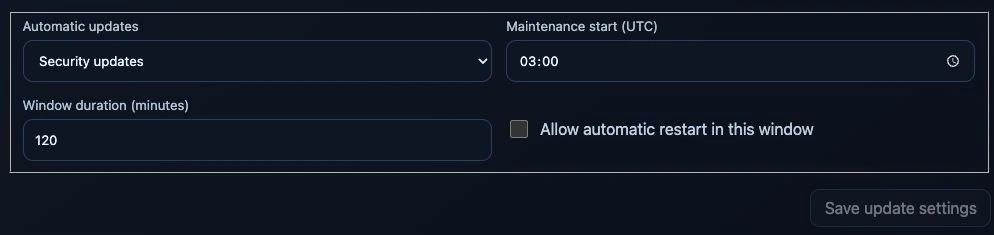
Settings on the test appliance, captured 24 September 2026. Save update settings is disabled because nothing was edited. No package check, installation or restart was triggered for this capture.
The dashboard offers three modes:
- Security updates: install eligible Ubuntu security fixes automatically.
- Security and regular Ubuntu updates: also permit the current release's
-updatespocket. This is not an Ubuntu release upgrade ordist-upgrade. - Manual installation: check in the daily window but do not install automatically.
The start time is explicitly UTC, with a 15–360 minute window. UTC does not shift with daylight-saving time. Busy computers retry every 15 minutes within the window. A started package transaction is allowed to finish after the window ends; a late package-index refresh never starts a new installation outside the window. A completed, failed or interrupted attempt is not replayed in that same window.
Check for updates refreshes APT metadata and package counts. Install security
updates and Install Ubuntu updates run immediately after exact-host
confirmation. Manual installation never automatically restarts the computer.
The page shows pending/security/held counts, a bounded package list, last check,
last successful installation and /run/reboot-required. The restart link opens
the separate Computer power tab.
Package installation can restart services, including services used by models and the dashboard. Optional automatic computer restart must be explicitly enabled. It is scheduled only after successful automatic installation, while at least one minute remains in the window, at most once per boot. If the window has ended, the restart remains pending and visible; users can restart manually.
Update boundaries
Only Ubuntu origins for the currently installed release are eligible: the base, security and optional updates pockets, plus configured Ubuntu ESM security origins. The existing APT mirror configuration is used. No third-party repository is automatically authorized, no release change is performed, and signature and APT/dpkg lock checks remain enabled.
Kernel, firmware, GPU driver/runtime packages, DKMS and graphics-stack packages
are excluded using the shared updates_contract.py package patterns. Package
holds remain respected. Their pending updates remain visible for a separately
reviewed hardware maintenance operation; the page does not claim that a reviewed
profile already exists for every pending hardware version. Dependencies on an
excluded package may defer other updates too. Existing local APT exclusions are
preserved.
K3s, GPU operators, Flux resources, inference engines and container images are not upgraded by APT. They continue through the pinned Magic Stick release and image-promotion workflows. No GPU validation or model workload is launched by the Ubuntu update manager.
Integration and persistence
Ansible provisions Ubuntu's unattended-upgrades, python3-apt and
update-notifier-common. Ubuntu's native apt-daily.timer refreshes package lists.
The native apt-daily-upgrade.timer schedules a bounded helper via a service
override; there is no additional cron loop or dashboard-root HTTP endpoint.
The root host worker accepts only the three bounded actions
configure-updates, check-updates, and install-updates through immutable
HostOperation resources. The API and worker both validate node UID, boot ID,
policy fingerprint, action-specific fields and administrator consent. The worker
also checks request age and durably records intent before effects. Dashboard
callers cannot supply package names, commands, paths or repositories.
Manual checks/installations are passed to magicstick-host-updates.service with
a root-owned approval record. The worker publishes progress while that service
holds the same maintenance lock used by hardware/network/power actions and host
convergence. Native APT/dpkg locks provide additional serialization. Interrupted
manual requests require a new explicit request; they are not automatically
replayed after a service or computer restart.
State is local to each computer:
| Path | Purpose |
|---|---|
/var/lib/magicstick/host-management/update-policy.json |
Saved policy, preserved by convergence |
/var/lib/magicstick/host-management/update-status.json |
Last attempt, completion, bounded package summary and replay state |
/var/lib/magicstick/host-management/approved-updates.json |
Root-only, short-lived manual approval; never an arbitrary command |
/etc/apt/apt.conf.d/99magicstick-updates |
Current Ubuntu origins and hardware exclusions |
/etc/systemd/system/apt-daily-upgrade.timer.d/magicstick.conf |
UTC schedule |
Detailed subprocess output stays on the computer, not in public Kubernetes annotations. The dashboard receives only allowlisted status fields.
Operations and recovery
Inspect state without triggering an installation:
sudo systemctl list-timers apt-daily.timer apt-daily-upgrade.timer
sudo systemctl cat apt-daily-upgrade.service apt-daily-upgrade.timer
sudo journalctl -u apt-daily-upgrade.service -u magicstick-host-updates.service
sudo tail -n 100 /var/log/unattended-upgrades/unattended-upgrades.log
sudo cat /var/lib/magicstick/host-management/update-status.json
test -f /run/reboot-required && echo 'Restart required'
After a failure, inspect these logs and the local package-manager state. Do not delete APT/dpkg lock files, force-kill a live package transaction, or bypass signature checks. Repair interrupted package configuration during deliberate maintenance before submitting a new dashboard request. Missing or stale host reports disable dashboard operations.
This follows Ubuntu's automatic update mechanism, with Magic Stick's additional maintenance coordination and hardware exclusions.