Manage deployed models
Before you start
Open Models with Operator or Administrator access. Check whether applications or mesh consumers are using a model before interrupting it. Catalog-only models without a Magic Stick activation can be read-only.
| Action | What happens |
|---|---|
| Edit | Opens the saved configuration. Review and save supported changes; runtime-affecting changes can reload the model. |
| Stop | Retains the model definition but disables it. Local runtime resources are removed and routes withdrawn. |
| Start | Recreates the runtime from its saved settings and republishes the route only when ready. |
| Restart | Where offered, restarts the existing engine runtime without creating a second model definition. |
| Logs | Shows bounded logs from the selected activation's local Pods/containers, including startup failures. |
| Remove | Deletes the model activation and its managed runtime. This is not the same as clearing downloaded caches. |
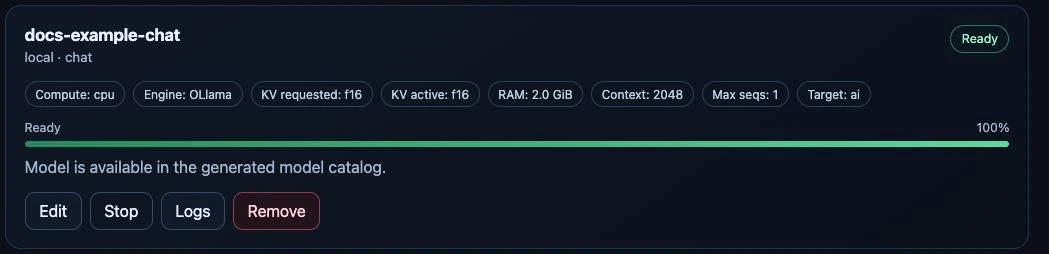
Live test-appliance capture, 24 September 2026. This small, owner-authorized test model illustrates the controls; its parameters are not sizing recommendations.
The common Start/Stop workflow covers Ollama, vLLM, FreeToken, Realtime and external activations. For external models it changes local routing only. Restart controls depend on the engine; Stop followed by Start is the common reload workflow when no separate Restart action is offered.
Understand the lifecycle
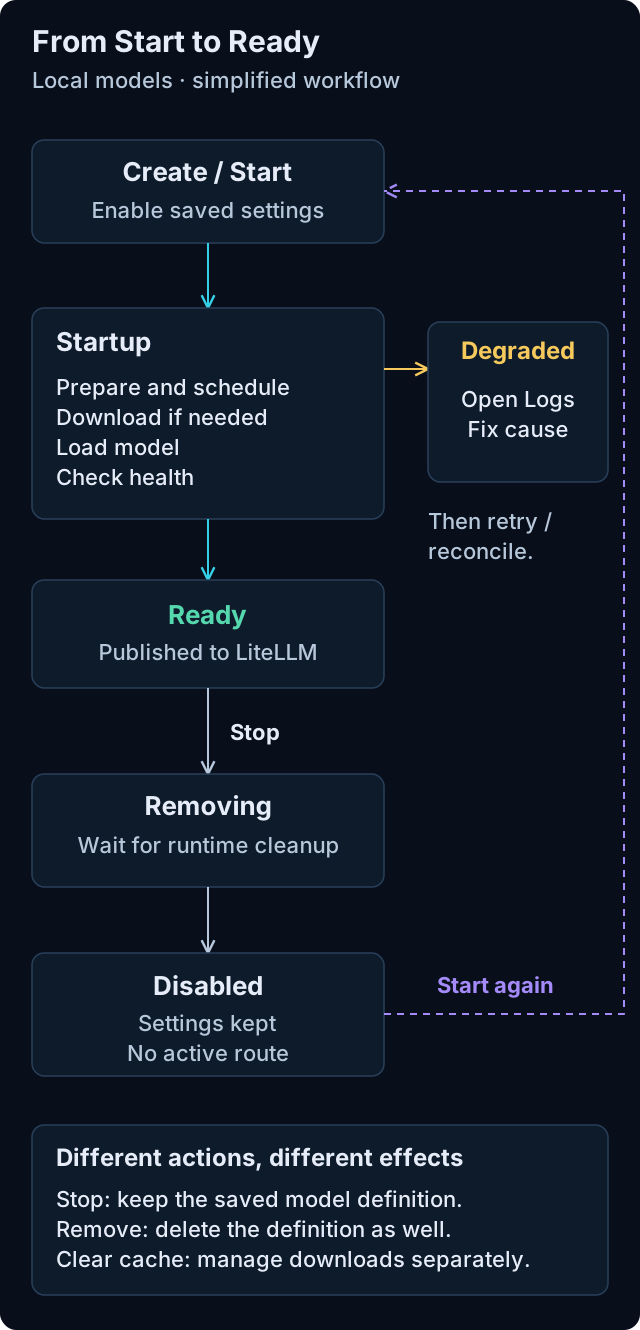
A simplified local-model workflow, not an exhaustive state machine. Open the diagram for full-size labels.
Startup includes dependency preparation, scheduling, any necessary downloads, model loading and health checks. Exact progress labels vary by engine. A failure can report Degraded during startup or after a model was ready: use Logs and the status message to identify the cause before retrying. Some temporary conditions recover through automatic reconciliation.
Stop retains the saved settings. Resources are released only after the runtime and its allocations have terminated. Remove also deletes the model definition; neither action is a substitute for cache cleanup. For external models, Start and Stop control local routing, not the remote provider.
Stop and start again
Choose Stop on the model card and wait for Disabled. The button then changes to Start. Starting uses the saved configuration; you do not need to find the checkpoint or enter its parameters again.
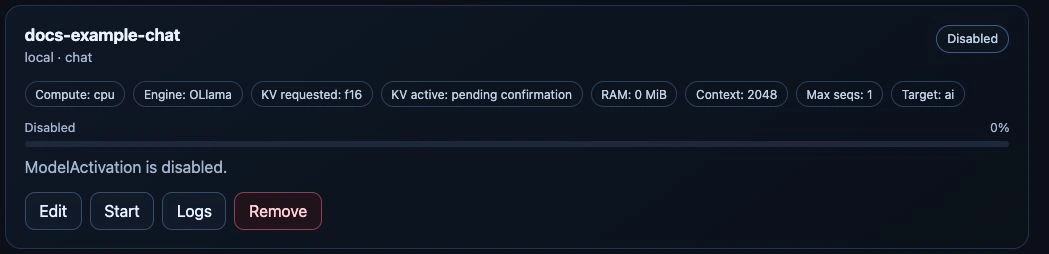
The same test model after Stop, 24 September 2026. The displayed RAM reservation has been released; the model definition and its configured budget are retained.
Edit runtime parameters
Choose Edit, adjust the supported fields, and review the memory budget before selecting Save changes. The model source, engine and hardware target remain unchanged in this dialog. Saving runtime-affecting settings can restart the model.
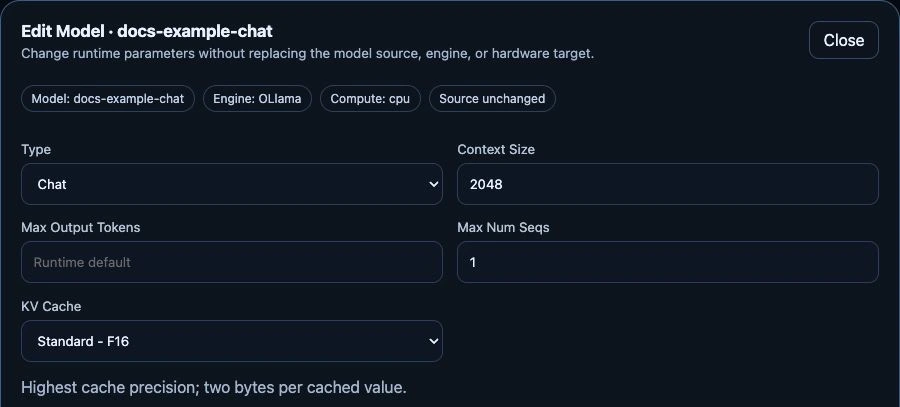
Unchanged editing form for the stopped test model, 24 September 2026. This crop shows the main parameters; memory controls and the save action continue below. No edits were saved for this capture.
Check the result
Stop passes through removal while Pods and GPU allocations terminate. Memory and slots may not become free immediately. Start can download weights again, especially for temporary FreeToken caches. Ready means routable; test an inference request before returning the model to users.
If another administrator changed the model while you were editing, refresh the configuration instead of overwriting a stale revision. Changing engine-specific settings must not silently carry incompatible fields to another engine.
For failures, read model diagnostics. For disk cleanup, use model cache management, not manual deletion of running Pods or files.